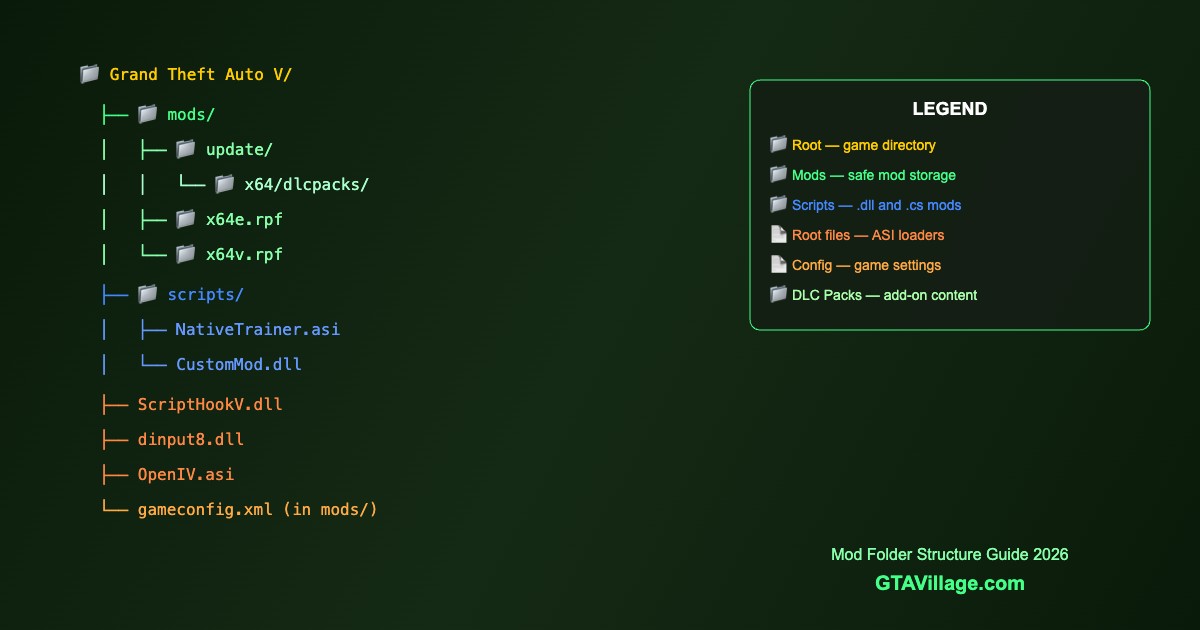
GTA 5 Mod Folder Structure — Best Organization Guide 2026
A well-organized mod folder structure is essential for stable GTA 5 modding. This guide explains where every file goes and how to keep your mods manageable.
Root Directory Structure
| File/Folder | Purpose | Required |
|---|---|---|
mods/ |
Contains all modded game files (OpenIV mods folder) | Yes |
scripts/ |
.NET script mods (.dll, .cs files) | For .NET mods |
ScriptHookV.dll |
Script Hook V library | Yes |
dinput8.dll |
ASI loader | Yes |
OpenIV.asi |
Redirects game to mods folder | Yes |
ScriptHookVDotNet.dll |
.NET Script Hook framework | For .NET mods |
Mods Folder Hierarchy
mods/
├── update/
│   └── update.rpf/
│       └── common/data/
│           ├── gameconfig.xml
│           ├── dlclist.xml
│           └── handling.meta
├── x64/
│   └── dlcpacks/
│       ├── mycar1/dlc.rpf
│       ├── mycar2/dlc.rpf
│       └── myinterior/dlc.rpf
├── x64e.rpf (vehicle replacements)
├── x64v.rpf (map textures)
└── x64a.rpf (animations)
Setting Up the Mods Folder
- Install OpenIV and open ASI Manager
- Click Install OpenIV.asi — this creates the mods folder redirect
- Create the
modsfolder in your GTA 5 root directory - Copy the RPF files you want to modify INTO the mods folder
- Always edit files INSIDE
mods/, never the originals
Add-On DLC Pack Structure
- Create folder:
mods/update/x64/dlcpacks/[modname]/ - Place
dlc.rpfinside the mod folder - Add entry to
mods/update/update.rpf/common/data/dlclist.xml - Format:
<Item>dlcpacks:/[modname]/</Item>
Organization Best Practices
-
Name DLC packs clearly — use descriptive names like
ferrari_f40notcar1 - Keep a spreadsheet of all installed mods with version numbers
- Backup regularly — zip the entire mods folder periodically
- Remove unused mods — clean dlclist.xml entries for removed packs
- Group by category — vehicles, scripts, textures in logical structure
- Never modify originals — always work inside the mods folder





Comments0
Sign in to leave a comment
No comments yet. Be the first to comment!